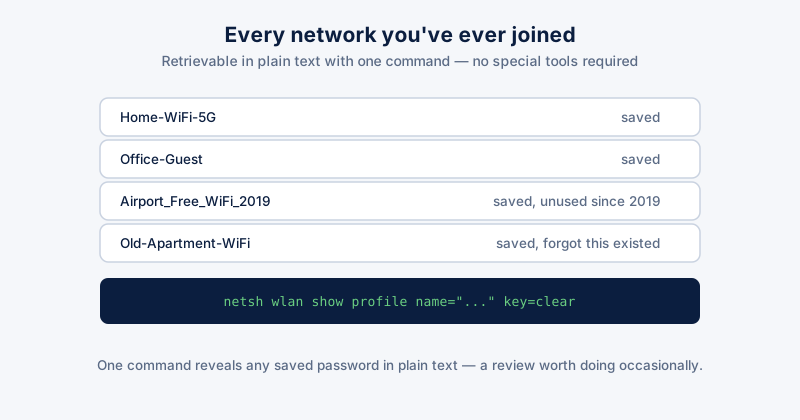
Windows saves the password for every WiFi network you've ever successfully connected to, and keeps it retrievable indefinitely — not just for reconnecting automatically, but recoverable in plain text by anyone with a few minutes of access to the machine, admin rights, and a command line.
How exposed this actually is
From an elevated Command Prompt, two commands are enough: netsh wlan show profiles lists every saved network name, and netsh wlan show profile name="NetworkName" key=clear reveals that network's saved password in plain text. No special tools required — this is a built-in Windows feature, not a vulnerability someone had to discover.
This matters most for shared or work devices, a PC being sold or handed down, or a machine that's been repaired by someone else — in each case, whoever has (or had) access could recover every WiFi password the PC has ever used, including networks at homes, offices, and public places you no longer even think about.
Checking what's actually saved
- Open Command Prompt and run: netsh wlan show profiles
- Review the list — it likely includes networks you haven't used in years, at addresses you no longer visit
- To remove one: netsh wlan delete profile name="NetworkName"
- To remove all saved networks at once: Settings → Network & internet → Wi-Fi → Manage known networks, then Forget each one individually
Forgetting a network removes the saved password and stops automatic reconnection — you'll need to re-enter the password next time you're on that network. Worth doing for networks you no longer use, not necessary for ones you connect to regularly.
Before selling, giving away, or returning a repaired PC
- Clearing saved WiFi profiles specifically (as above) is more targeted than a full factory reset if you're just repurposing the machine yourself
- If the PC is leaving your possession entirely (sold, donated, returned after warranty repair), a full reset via Settings → System → Recovery → Reset this PC is the safer option — it clears saved networks along with everything else
- For a repaired PC that returned from a third-party shop, treat any WiFi passwords the machine knew as potentially exposed and consider changing the password on networks it had access to, particularly your home network
The broader pattern
Saved WiFi passwords are one specific case of a more general fact: Windows quietly retains credentials for things you've connected to over the years, well past when you'd remember they're stored anywhere. It's worth an occasional review, not because any single saved network is high risk, but because the total list accumulates a surprising amount of access most people have never once looked at.
ETA System Doctor's Wi-Fi & Network Tools shows every saved WiFi password in one place for review and cleanup, and its Password Vault gives you a secure place to keep the ones you actually want to hold onto, rather than leaving them recoverable in plain text via a command line indefinitely.