Handing your face or fingerprint to sign into a PC can feel like a bigger privacy trade than typing a password — biometric data feels more permanent and more personal. The actual architecture behind Windows Hello is worth understanding on its own terms, rather than assuming it works the same way as, say, a cloud photo service that scans faces across your library.
Where the data actually lives
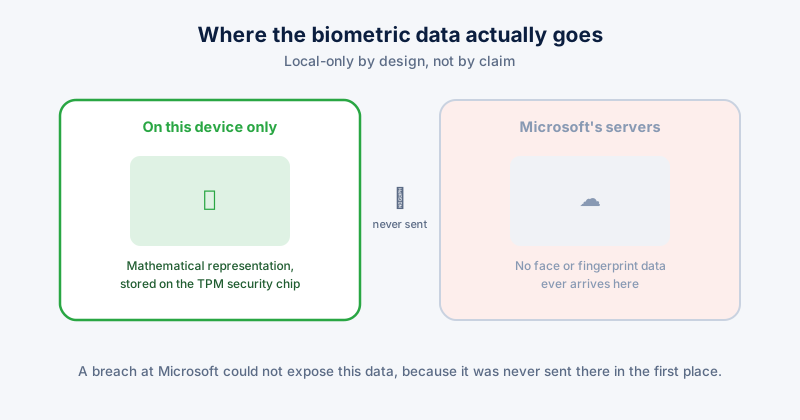
Windows Hello doesn't store your actual fingerprint image or a photo of your face. It captures the biometric reading, converts it into a mathematical representation, and stores that on the device — on hardware with a Trusted Platform Module (TPM), it's kept in a secure, isolated part of that chip specifically, separate from the general filesystem. It never leaves the device, and it is never uploaded to Microsoft's servers, synced to your Microsoft account, or transmitted anywhere during normal use.
This is a genuinely different model from many phone camera apps or cloud photo services that do build biometric-adjacent profiles server-side for features like face-grouping in photo libraries. Windows Hello sign-in specifically is local-only by design, and that's a meaningful, verifiable distinction, not just marketing language.
What that means in practice
- A data breach at Microsoft could not expose your face or fingerprint data from Windows Hello, because it was never sent there in the first place
- It doesn't transfer between devices. Setting up Windows Hello on a new PC means enrolling your face or fingerprint again — there's no cloud record to restore from, because none exists
- Removing it is complete. Deleting your Windows Hello enrollment (Settings → Accounts → Sign-in options) removes the local biometric data from that device; there's no remote copy left behind anywhere
What's worth checking on your own setup
- Settings → Accounts → Sign-in options → confirm which biometric methods are actually enrolled, and remove any you don't use, particularly on a shared device
- If your device lacks a TPM or dedicated secure hardware, Windows Hello still functions but with a weaker security boundary around where that mathematical representation is stored — most PCs from the last several years do have this hardware
- On a device you're about to sell, give away, or return, a full reset (Settings → System → Recovery → Reset this PC) clears biometric enrollment along with everything else
The genuine trade-off, honestly stated
The real privacy consideration with biometric sign-in isn't data leaving your device — it doesn't. It's that a fingerprint or face, unlike a password, can't be changed if the local device itself is ever compromised at a low enough level to extract that stored representation. That's a narrow, hardware-security scenario rather than a routine risk, but it's the honest version of the trade-off, rather than either "biometrics are always safer" or "biometrics are always riskier" as a blanket claim.
ETA System Doctor's "Am I Being Watched?" Check covers the adjacent, more common concern — showing exactly when your camera or microphone was last accessed and by which app — since that's a more frequent real-world privacy question than the Windows Hello storage model itself, which is genuinely sound by design.